Oversee the continent as the Secretariat
Who this is for: the AfCFTA Secretariat.
What you will achieve: a picture of how transit is working across Africa this month: how much is moving, how much is completed, where the borders are slow, what is overdue, and which administrations are having trouble with their systems.
1. Open the continent's figures
- Sign in, and select Overview in the header.
- Leave Scope on Africa and Period on This month.
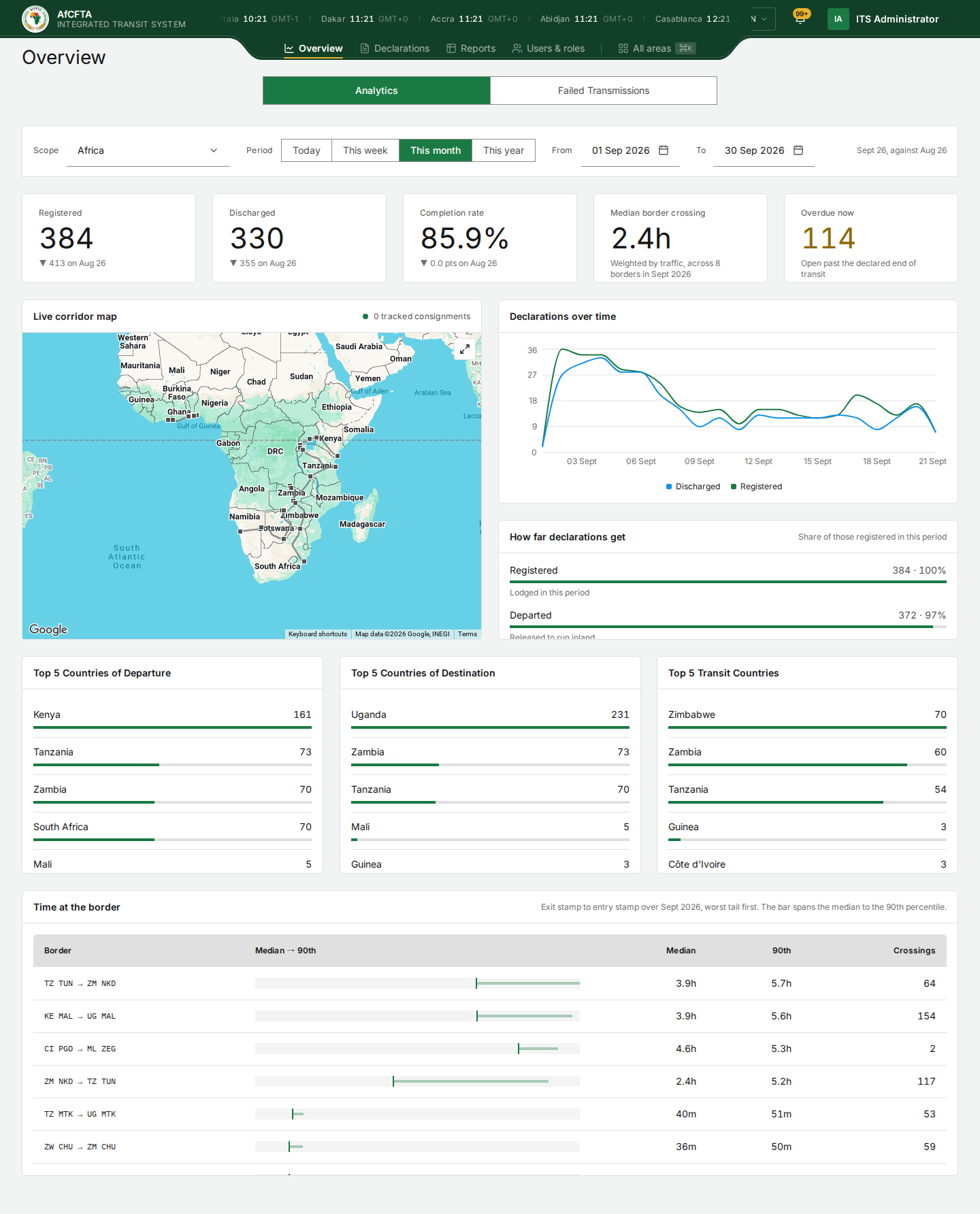
Read the five figures. Remember that This month is the month so far, compared with the whole of last month, so early in the month every comparison points down. For a fair comparison, set From and To to the same days of last month. See Overview.
2. Find where the borders are slow
Scroll to Time at the border. The crossings are listed worst first by their 90th-percentile time: the time within which nine crossings in ten are completed. A crossing with a long bar between median and 90th percentile is unpredictable, not only slow.
For the full picture by crossing and country, open Reports, then Time & delays. See Reports.
3. Look at what is overdue
Overdue now is the number of declarations still open after their transit window closed. For the list, open Reports, then Register, and read the overdue worklist; each row names the declaration and how many days overdue it is. Open a few, and look at Held by on each: the country holding an overdue declaration is the one to ask.
4. See who is having trouble
- Select the Failed Transmissions tab.
- Choose an organisation in the filter beside the search, or leave it to see every organisation.
Discount the rows for the portal's own requests (/api/v1/authz/tenants, /api/v1/notifications/…, Not authorised · ERR-006). What remains are refusals of administrations' systems: a pattern of the same refusal from one administration is worth raising with its technical team. See Failed transmissions.
The Integration report shows refusals by reason and by organisation over the period. See Reports.
5. Read the notifications
Select the bell, then View all notifications, and filter Category to Onboarding, Integration or Adoption: those are the ones addressed to the Secretariat as the body that governs the system. See Notifications.
6. Answer a query about one declaration
When an administration or a trader raises a specific consignment, find it in Declarations; the Secretariat's register holds every declaration on the continent. See Find a consignment and Follow a declaration to discharge.
What "done" looks like
- You know this month's volume, completion rate and median border time, against a fair comparison.
- You know the three slowest crossings.
- You know which administrations hold the most overdue declarations.
- You know which administrations' systems are being refused, and why.