Settings
Settings shows the rules and limits the AfCFTA Secretariat sets for every State Party and every REC alike: how much one declaration may carry, the rules on a transit's dates, when an open transit counts as overdue, and a few values that govern how ITS itself runs. There is one value for the whole continent. No State Party or REC has its own.
Most people open this page to read it: to see why a declaration was refused, or what "overdue" means today. Only the Secretariat changes anything, as described in Change a setting.
Open Settings
- In the header, select All areas (or press
⌘K/Ctrl+K). - Under Administration, select Settings. Its line reads "Rules and limits that apply to every State Party and REC".
Settings is reached only from All areas. It is not in the account menu.
Who can read and who can change
The page has three sections. A section you may not read is not shown at all.
| Role | Declarations | Transit rules | Operations | History, change and withdraw |
|---|---|---|---|---|
| Secretariat admin | Read | Read | Read | Yes, in all three sections |
| System admin | Read | Read | Not shown | Yes, in the two sections it reads |
| Organisation admin (State Party or REC) | Read | Read | Read | No |
| Customs officer, Departure authority, Partner | Read | Read | Not shown | No |
See What each role can do for the roles themselves.
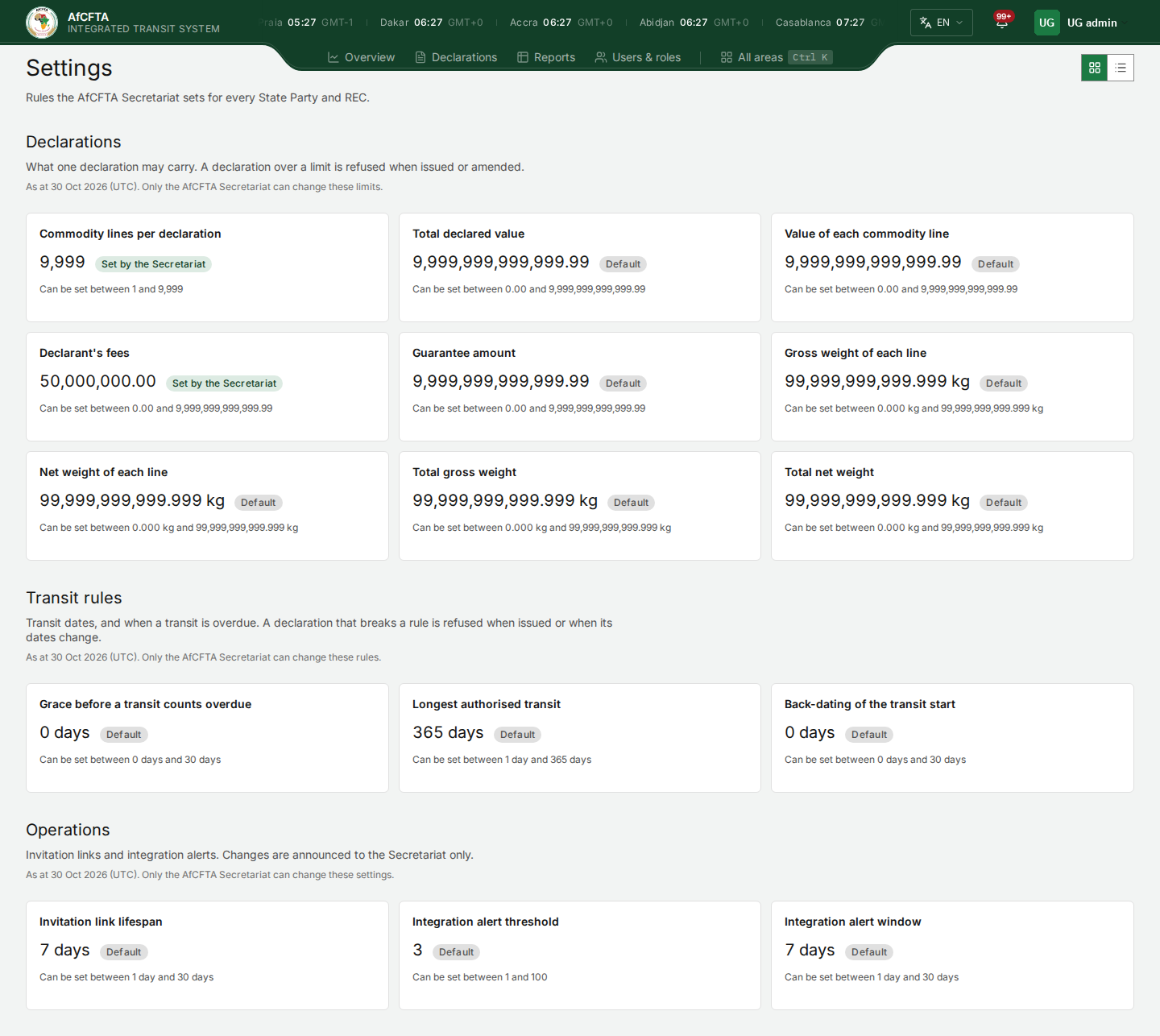
Everyone who reads a section reads the same values, including changes that are already scheduled. If you cannot change a section, its "As at" line ends with a sentence that says so, for example "Only the AfCFTA Secretariat can change these limits.". Its cards carry no Change button, and a setting's details show no History.
If your account can read none of the three sections, Settings is not in All areas, and its address shows "You do not have access to this area" with "Ask the Secretariat to check the role on your ITS account."
How the page is laid out
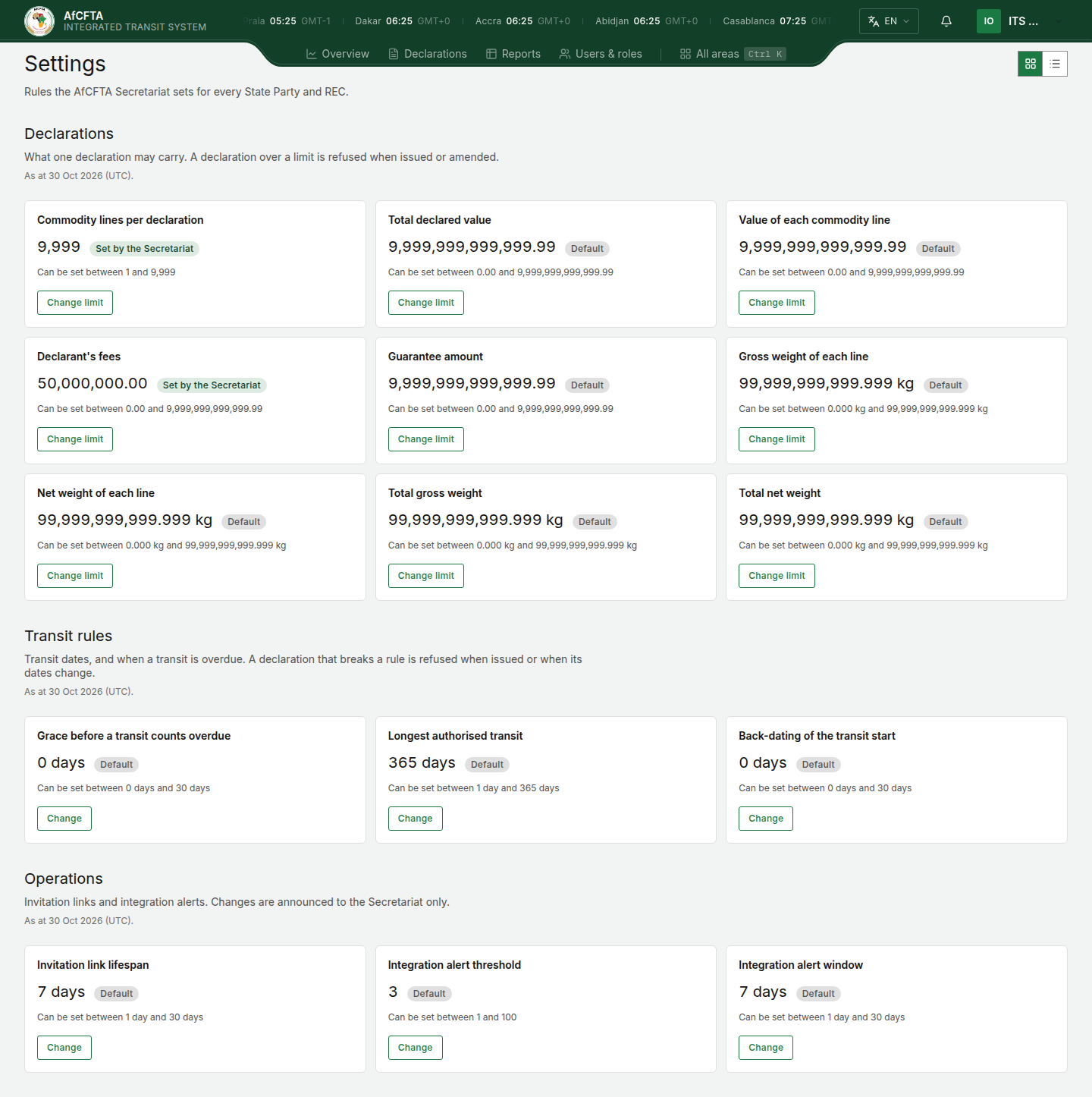
Under the title, "Rules the AfCFTA Secretariat sets for every State Party and REC.", come the three sections, always in the same order. Each has a heading, a short introduction, and a line "As at date (UTC)." giving the day the values were read for.
Cards or a table
Two small buttons at the top right of the page choose how the settings are shown: the grid button shows Cards, the list button shows a Table. Cards are the starting choice. ITS remembers your choice in this browser for your account, so the page opens the same way next time. Another person signing in on the same computer gets their own choice.
As cards, every setting is a card:
| On the card | What it tells you |
|---|---|
| Title | The setting. |
| The value, large | The value that applies now. A green Set by the Secretariat tag means the Secretariat chose it. A grey Default tag means the Secretariat has set nothing and the built-in value applies. |
| Can be set between | The lowest and highest value the Secretariat may choose. |
| An amber Scheduled: line | Only when a change is already decided: its value and the moment it starts, for example "Scheduled: 500 from 15 Nov 2026 06:30:00 UTC". With more than one, the line ends "and n more". |
| Change limit (Declarations) or Change | Only for those who may change the section. See Change a setting. |
As a table, each section is one table with a row per setting:
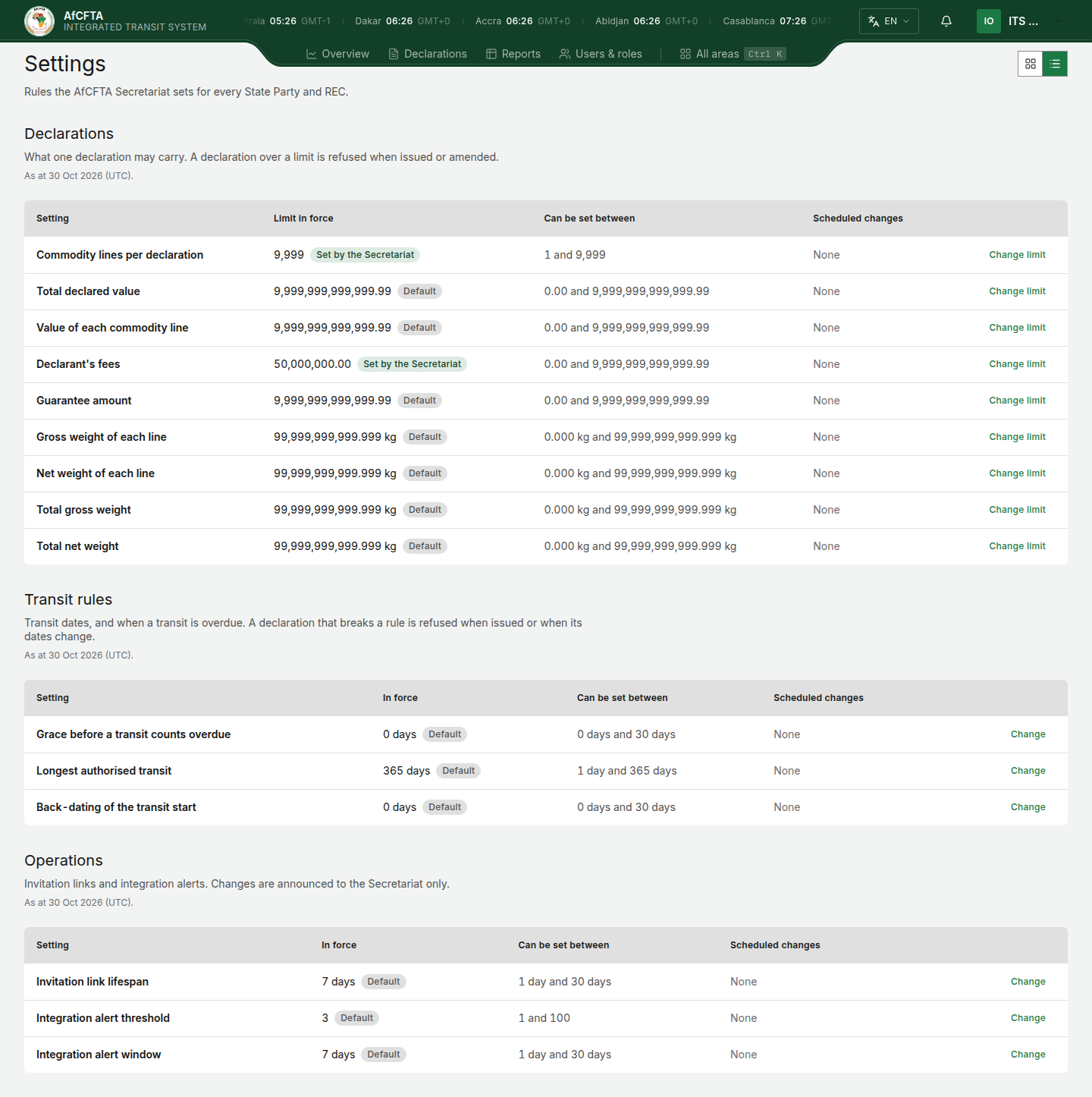
| Column | What it tells you |
|---|---|
| Setting | The setting. |
| Limit in force (Declarations) or In force | The value that applies now, with its Set by the Secretariat or Default tag. |
| Can be set between | The lowest and highest value the Secretariat may choose. |
| Scheduled changes | Every change already decided, one per line, or None. |
| (no heading) | Change limit or Change, only for those who may change the section. |
On a small screen the table scrolls sideways inside its own box.
Weights are shown with "kg" and spans of time with "day" or "days". Money limits carry no currency: each is compared with the amount in the declaration's own currency.
A setting's details
Select a card or a table row anywhere except its button (or move to it with
Tab and press Enter) to open its details in a panel on the right.
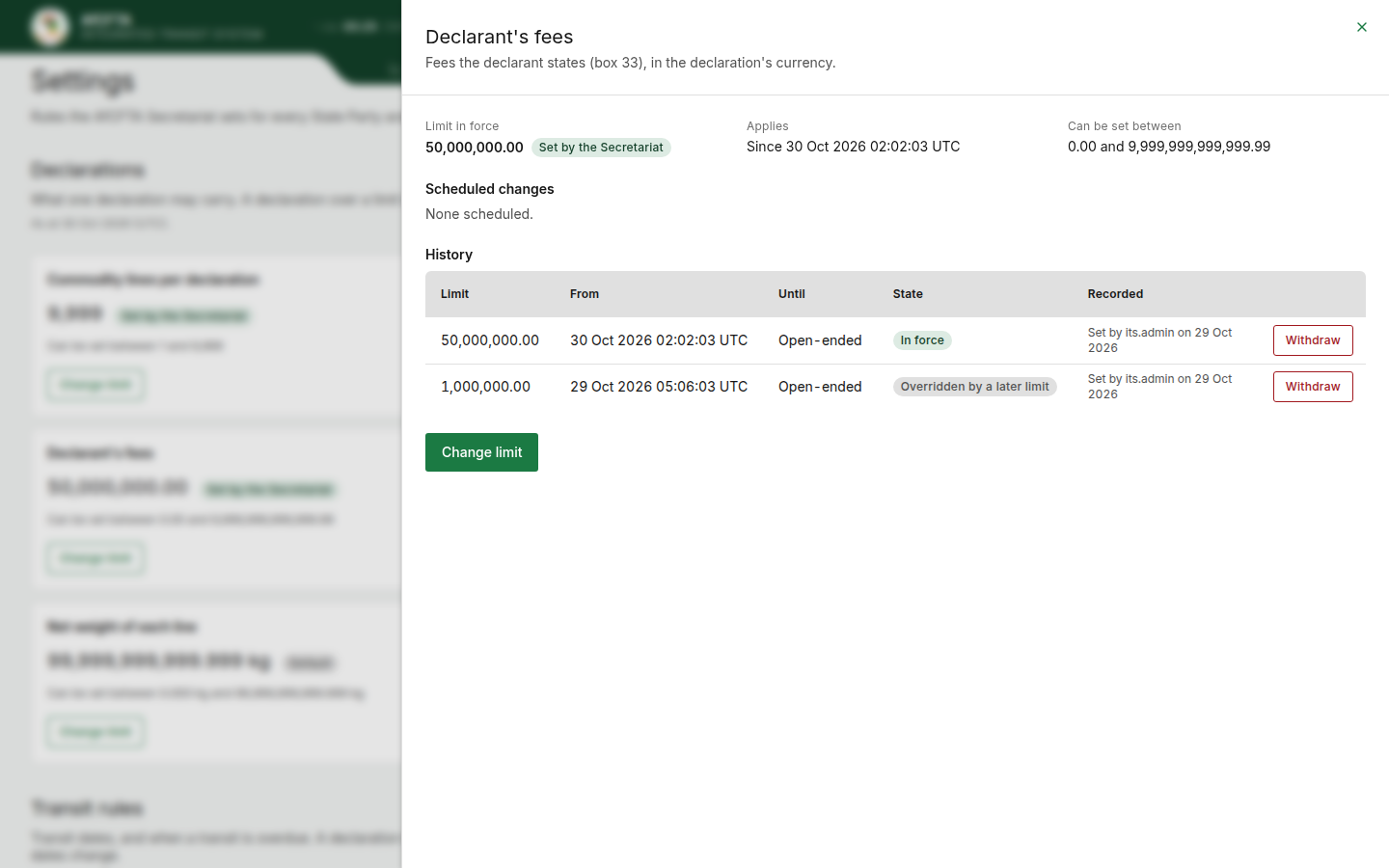
| In the panel | What it tells you |
|---|---|
| Title and one sentence | What the setting controls, and the box or section of the Transit Document it relates to. |
| Limit in force or In force | The value that applies now, with its tag. |
| Applies | Since when the value has applied: "Since moment", or "From moment until day". For a default: "Always — the system maximum, until the Secretariat sets a limit" in Declarations, and "Always — the default, until the Secretariat sets a value" in the other sections. |
| Can be set between | The lowest and highest value the Secretariat may choose. |
| Scheduled changes | None scheduled., or one line per change already decided: an amber Scheduled tag, the value and the moment it starts. |
| History | Only for the Secretariat: every value recorded for the setting. See See the history of a setting. |
| Change limit or Change | Only for those who may change the section. |
Close the panel with the cross at its top right, or press Esc.
Times on this page
A value starts at a moment: a UTC day and a UTC time to the second, shown
as, for example, 15 Nov 2026 06:30:00 UTC. Because the moment is in UTC, it
is the same instant for a reader in Dakar and in Mombasa. An end, where there
is one, is a UTC day.
While loading, and when a section fails
While a section loads, grey placeholder blocks stand in for its settings. If a section cannot be loaded, an error panel takes its place; quote its correlation ID when you report it. The other sections still work.
Declarations
"What one declaration may carry. A declaration over a limit is refused when issued or amended."
In everyday terms: if a declaration states more than a limit allows, ITS refuses it and nothing is recorded. The limits apply in the same way to a State Party filing for itself and to a REC filing for a member. A declaration already issued stays valid when a limit is lowered afterwards. It is only checked again if someone amends the part of it that the limit is about.
Each limit's default is its highest value, which is the most ITS can record. Until the Secretariat sets a lower one, that maximum applies.
| Setting | What it limits | Lowest | Highest, and default |
|---|---|---|---|
| Commodity lines per declaration | How many goods lines one declaration may carry (box 24 onwards). | 1 | 9,999 |
| Total declared value | The declared value of the whole consignment (box 11). | 0.00 | 9,999,999,999,999.99 |
| Value of each commodity line | The value of any one goods line (box 32). | 0.00 | 9,999,999,999,999.99 |
| Declarant's fees | The fees the declarant states (box 33). | 0.00 | 9,999,999,999,999.99 |
| Guarantee amount | The amount of the guarantee (box 21). | 0.00 | 9,999,999,999,999.99 |
| Gross weight of each line | The gross weight of any one goods line (box 29). | 0.000 kg | 99,999,999,999.999 kg |
| Net weight of each line | The net weight of any one goods line (box 30). | 0.000 kg | 99,999,999,999.999 kg |
| Total gross weight | The gross weight of the whole consignment (box 9), added up from its lines. | 0.000 kg | 99,999,999,999.999 kg |
| Total net weight | The net weight of the whole consignment (box 10), added up from its lines. | 0.000 kg | 99,999,999,999.999 kg |
Commodity lines are a whole number. Money limits take up to two decimal places and weights up to three.
Who can change them: Secretariat admin and System admin.
Transit rules
"Transit dates, and when a transit is overdue. A declaration that breaks a rule is refused when issued or when its dates change."
All three rules are whole numbers of days. They are the same for every State Party and every REC.
| Setting | What it controls | Lowest | Highest | Default |
|---|---|---|---|---|
| Grace before a transit counts overdue | Days after the authorised end of a transit before a transit still open counts as overdue. See below. | 0 days | 30 days | 0 days |
| Longest authorised transit | The most days a transit may be authorised for, from its start to its authorised end (section G). A declaration asking for longer is refused. | 1 day | 365 days | 365 days |
| Back-dating of the transit start | How many days before today a transit's start may be (section G). At 0 days, a transit cannot be declared to have started before today. | 0 days | 30 days | 0 days |
Longest authorised transit and Back-dating of the transit start are checked when a declaration is issued, and again only when an amendment changes its dates. A rule tightened after a declaration was issued does not affect that declaration unless someone amends its dates. For back-dating, an amendment is measured from the day the declaration was issued, and only if it moves the start.
Who can change them: Secretariat admin and System admin.
Grace before a transit counts overdue
Every transit has an authorised end date (section G of the Transit Document). The grace is the number of extra days ITS waits after that date before it calls a transit that is still open overdue.
- A transit is overdue once it is still open and the last day of the grace has ended. Days end at midnight UTC.
- With the default grace of 0 days, a transit whose authorised end is 10 March is overdue from 11 March.
- With a grace of 2 days, the same transit is overdue from 13 March.
- A transit that has already been closed is never overdue.
The grace refuses no declaration and changes no date on any declaration. It only decides when an open transit is reported as overdue, and so it moves these figures everywhere at once, for every State Party and REC:
- the overdue mark on a declaration and the overdue count on the declarations register;
- the overdue lists in Reports;
- the on time figures in Reports: a transit closed by the end of the last day of the grace counts as on time, and one closed later, or still open after it, does not.
A longer grace therefore means fewer overdue transits and a higher on-time share. A shorter one means the opposite: "An open transit counts overdue sooner after its authorised end."
When the grace changes, the on-time figures in Reports are worked out again under the grace then in force.
Operations
"Invitation links and integration alerts. Changes are announced to the Secretariat only."
| Setting | What it controls | Lowest | Highest | Default |
|---|---|---|---|---|
| Invitation link lifespan | How long an emailed invitation to ITS stays usable before it has to be sent again. | 1 day | 30 days | 7 days |
| Integration alert threshold | How many failed deliveries to one country, within the alert window, raise an integration alert for it. A plain count, not days. | 1 | 100 | 3 |
| Integration alert window | The period over which failures are counted towards the alert threshold. | 1 day | 30 days | 7 days |
The threshold and the window work together: with the defaults, an integration alert is raised for a country once 3 deliveries to it have failed within 7 days.
Who can read them: Secretariat admin and Organisation admin. Who can change them: Secretariat admin.
How you hear about a change
When the Secretariat records or withdraws a value in Declarations or Transit rules, ITS tells every State Party and REC that is LIVE, that is, connected to ITS for real rather than still testing in the sandbox:
- By e-mail, to each LIVE organisation's administrator and technical contact, each in their own language. This e-mail cannot be switched off. Its button, Open the Settings page, opens Settings at the setting it is about.
- In the bell, to each LIVE organisation's administrators.
The Secretariat gets the bell notice too, as its record that the continent was told, but no e-mail. A State Party or REC still in the sandbox is not told.
A change in Operations is announced to the Secretariat only, in the bell, and is never e-mailed.
The announcement goes out when the change is recorded, which can be well before the moment it starts. Until then the change is also listed on the setting under Scheduled changes. A change that does not alter what applies, such as withdrawing a value that another value already overrides, is not announced. A bell notice about a declaration limit opens Settings at that limit. See Notifications.