Check a document at the roadside
Who this is for: a traffic, police or customs officer at the roadside, a weighbridge or a checkpoint. No ITS account is needed.
What you will achieve: you will know whether the Transit Document in your hand was issued by AfCFTA ITS, and whether it still covers goods in movement.
Before you start: a phone with a camera and a mobile data connection.
1. Scan the QR code
- Open your phone's camera and point it at the QR code on the Transit Document.
- Open the link the camera offers.
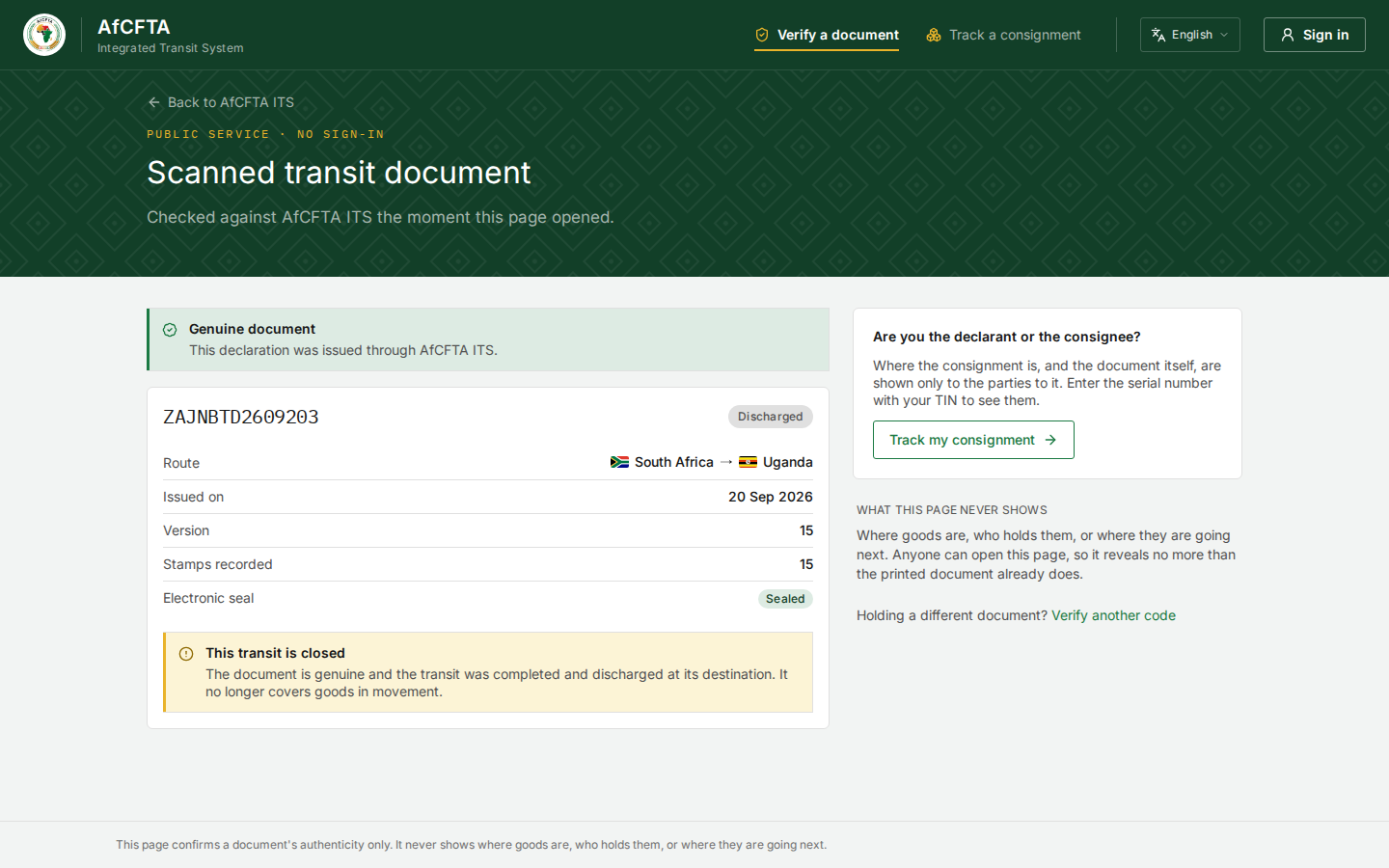
The ITS Verify page opens and checks the code at once. If the QR code is damaged, open the ITS landing page, select Verify a document and type the 26-character code printed under it. See Verify a document.
2. Read the verdict
| The page says | Your conclusion |
|---|---|
| Genuine document, and nothing else | The document is real and in force. Carry on to step 3 |
| Genuine document and This transit is closed | The document is real, but the transit it covers has been discharged. Goods still travelling under it are not covered |
| This declaration is cancelled / Withdrawn — do not rely on this paper | The declaration was cancelled. The goods are not covered |
| No match | ITS never issued this code. Check you typed it correctly; if it still does not match, the document is not an ITS document |
| Verification is unavailable | ITS could not be reached. Try again when you have a signal |
3. Compare the page with the paper
A genuine code on a doctored paper is still a doctored paper. Check that the page and the document agree on:
- the serial number, at the top of both;
- the route, the departure and destination countries;
- the issue date.
Version on the page is the latest version. The paper can be an earlier one, which is normal: every stamp adds a version. A paper whose details differ from the page, though, is suspect.
What the page will not tell you
The Verify page never shows where the goods are now, which country holds them, where they are going next, or anything about the cargo, the parties or the guarantee. That is on purpose: anybody can scan a QR code. See What the public never sees.
If you need more, ask the driver to call the declarant or the consignee, who can see the corridor on the Track page, or contact the customs administration of the country you are in.