Follow a declaration to discharge
Who this is for: anyone signed in who has to account for one consignment from start to finish: a State Party checking a transit through its territory, or the Secretariat answering a query.
What you will achieve: you will be able to tell the whole story of one declaration: when it was lodged, every border it crossed and when, whether each administration was told, whether it was closed properly, and you will have the final document.
Before you start: the declaration's serial number. The example below is ZAJNBTD2609203, South Africa to Uganda through Zimbabwe, Zambia and Tanzania.
1. Open the declaration
- Select Declarations and search for the serial number.
- Select it.
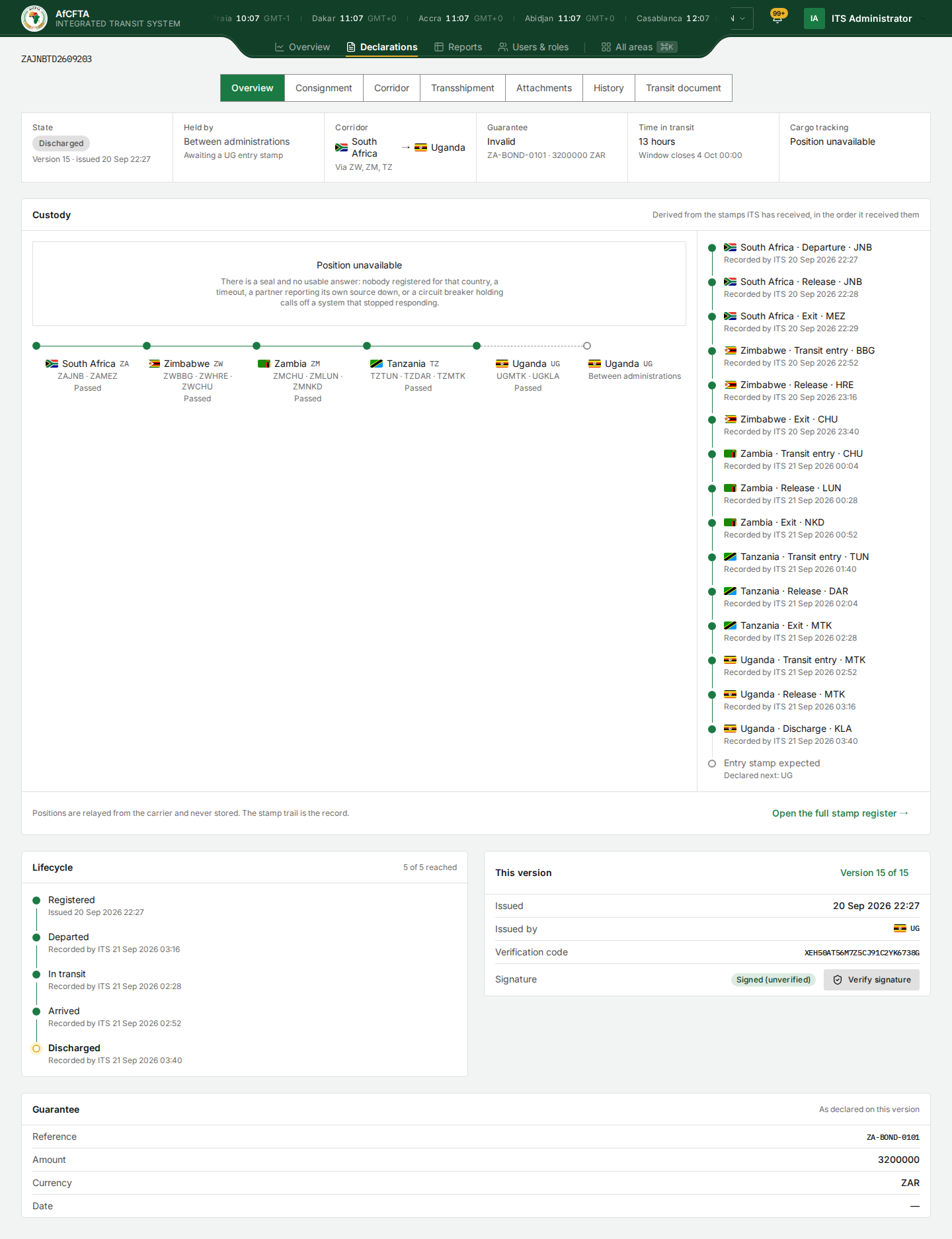
State reads Discharged: the transit is closed. The rest of this walkthrough checks that the journey behind it is complete.
2. Read the stamps in order
- Select the Corridor tab.
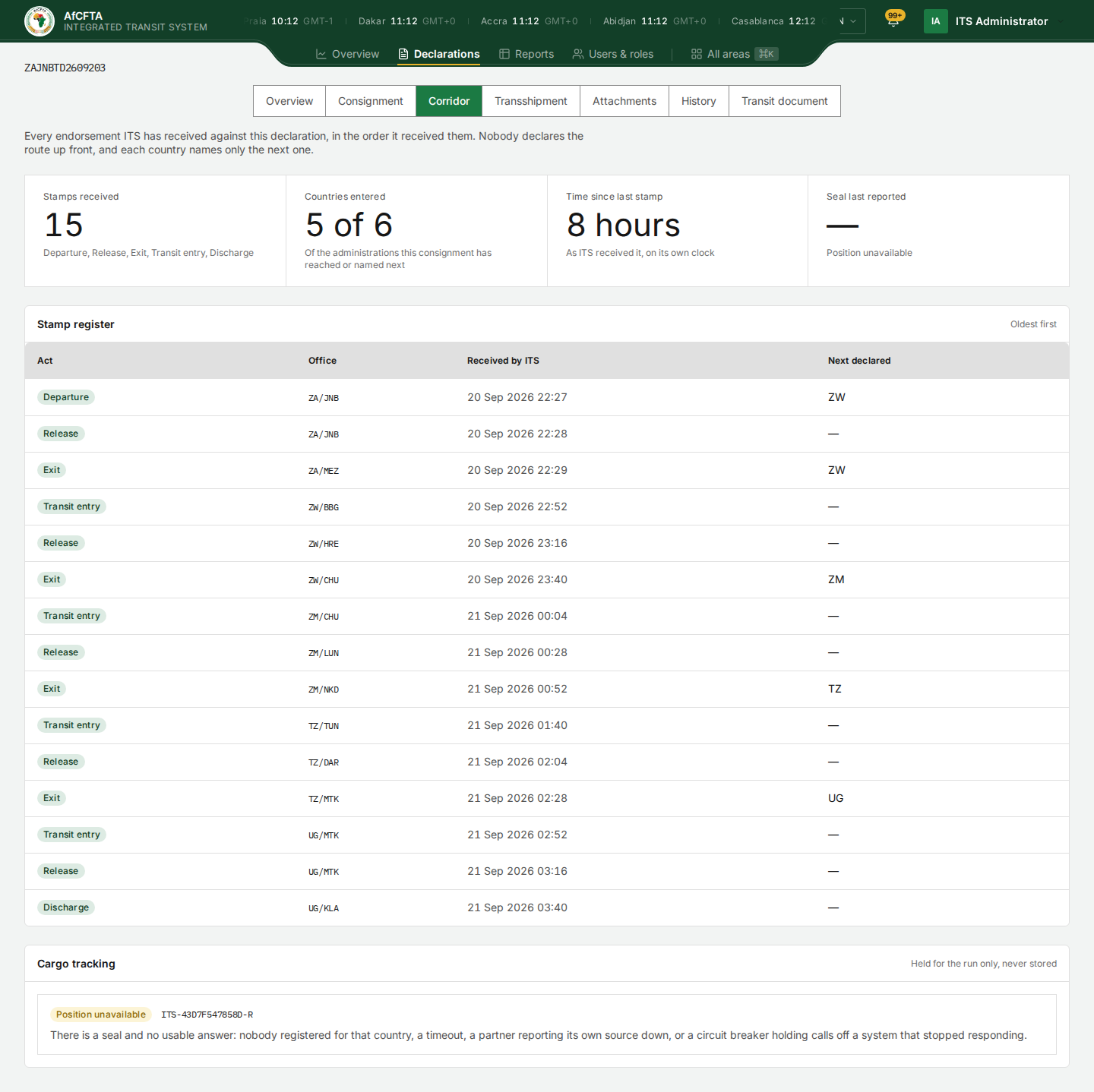
A complete journey reads, country by country:
| Country | Stamps to expect |
|---|---|
| South Africa (departure) | Departure, Release, Exit, naming ZW next |
| Zimbabwe, Zambia, Tanzania (transit) | Transit entry, Release, Exit, naming the next country |
| Uganda (destination) | Transit entry, Release (for an inland office), Discharge |
Check that every exit is followed by the named country's transit entry. The gap between an exit and the next entry is the time at that border; the Time at the border tile on the Overview shows the typical figure for each crossing.
The times are when ITS received each stamp, not when the officer signed. A stamp sent late sits late in the list.
3. Check the discharge
The last stamp should be Discharge, at the office of destination declared in section A of the Consignment tab (here UG/KLA, Kampala). A discharge anywhere else is refused by ITS, so a discharge in the list is always at the right office.
After the discharge, the Overview tab can still say Held by: Between administrations — Awaiting a UG entry stamp, and the corridor can show Uganda twice. That is a display fault. The discharge is the last act, and nobody holds a discharged declaration.
4. Check the versions
- Select the History tab.
The Versions list should show one version per act: version 1 issuance, which carries the departure stamp, and then one endorsement for each later stamp. Here, fifteen stamps make fifteen versions. A version of another kind means something else happened: a correction, an attachment or a cancellation.
To see what changed in any one version:
- In Compare, choose the version before it; in with, the version itself.
- Select Show what moved.
For a stamp, the answer is No declared fact moved. For a correction, you see each field's old and new value.
5. Check who was told
On the same tab, Who has been told lists every announcement ITS sent, with the date each administration's system acknowledged it. Every country on the corridor should appear against the versions other countries created, marked acked. A pending entry means that administration's system has not acknowledged it; no endpoint registered means the country has no system on ITS to tell.
6. Keep the final document
- Select the Transit document tab.
- Select Download PDF to keep a copy, or Print to print one.
Serving a copy changes nothing on the declaration. To keep the document as it stood at an earlier point, use the PDF link beside that version on the History tab. See The transit document.
What "done" looks like
- Every exit is followed by the next country's transit entry.
- The last stamp is Discharge, at the declared office of destination.
- The versions match the stamps, and any other version is explained.
- Every country on the corridor acknowledged the announcements.
- You have the final Transit Document.