Declaration details
Each declaration has one page, with seven tabs. Together they answer everything the portal can tell you about it: where it is and who holds it, what was declared, every stamp, the vehicles, the documents filed against it, every version and who was told, and the printed form.
Nothing on this page changes the declaration. There are no stamp, amend or cancel buttons, for anyone: those acts come from the customs systems. See Who uses ITS.
How to open it
- Open Declarations.
- Find the declaration, by searching or filtering. See Declarations.
- Select its serial number, or anywhere on its row.
The page opens on the Overview tab. Each tab has its own address, so you can send a colleague straight to, say, the History of a declaration.
| Tab | What it answers |
|---|---|
| Overview | Where is it, who holds it, and is it in order? |
| Consignment | What was declared, section by section? |
| Corridor | Every stamp, in the order ITS received them |
| Transshipment | Which vehicle carried the goods over which stretch? |
| Attachments | Which documents were filed against it? See Attachments |
| History | Every version, what changed, and who has been told |
| Transit document | The printed form. See The transit document |
Overview
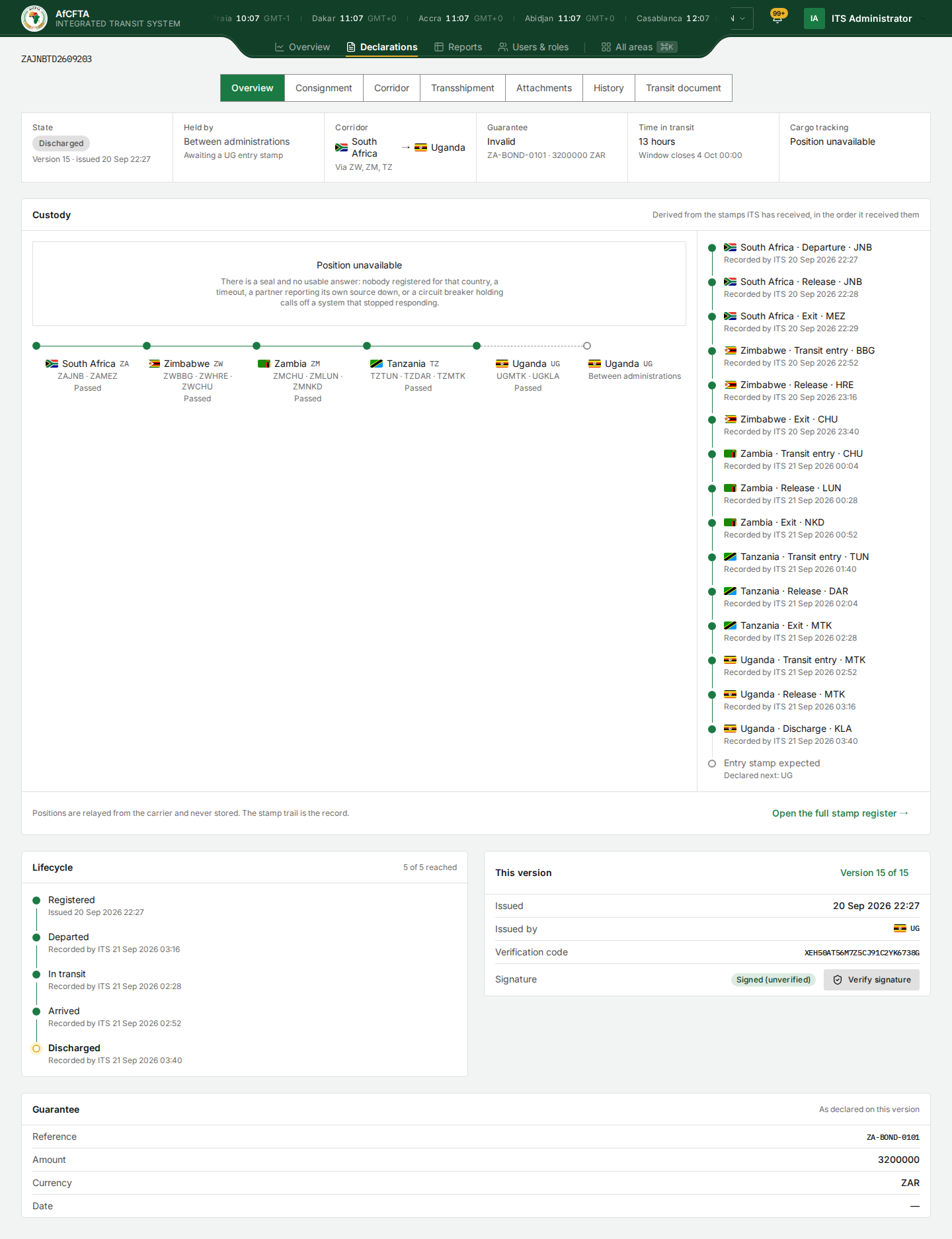
The fact strip
The row of six facts across the top.
| Fact | What it shows |
|---|---|
| State | The state, with Version 15 · issued 20 Sep 22:27 under it |
| Held by | The country holding the declaration now, or Between administrations with the entry stamp it is waiting for |
| Corridor | Departure → destination, with the transit countries so far as Via ZW, ZM, TZ |
| Guarantee | The guarantee verdict, with its reference and amount. See Key concepts |
| Time in transit | How long since the declaration was lodged, and when its transit window closes |
| Cargo tracking | Tracked, No electronic seal or Position unavailable |
Custody
The Custody tile draws the corridor as a line of countries, each with the offices that stamped it and Passed, Here now or Between administrations. The list on the right is every stamp, newest last, as South Africa · Departure · JNB, Recorded by ITS 20 Sep 2026 22:27.
A dashed line into the last country means nobody holds the goods: one country has stamped its exit and the next has not stamped entry. The empty circle at the end of the list, Entry stamp expected with Declared next: UG, names the country ITS is waiting for.
Open the full stamp register → opens the Corridor tab.
Lifecycle
The five states a declaration can reach, Registered, Departed, In transit, Arrived and Discharged, each with the time it was reached. 5 of 5 reached counts them. The current state has an amber ring.
This version
| Row | What it shows |
|---|---|
| Version 15 of 15 | Which version you are reading, of how many |
| Issued | When this version was issued |
| Issued by | The country whose act created this version |
| Verification code | The code printed under the QR code. Anyone can check it on the Verify page |
| Signature | Signed (unverified) or Unsigned, and Verify signature, which checks the signature in your browser. See Key concepts |
Guarantee
The guarantee as declared on this version: Reference, Amount, Currency and Date.
A State Party and a REC see the same tabs and tiles as the Secretariat, for declarations in their scope. Held by can show a country code, such as TN, instead of a country name.
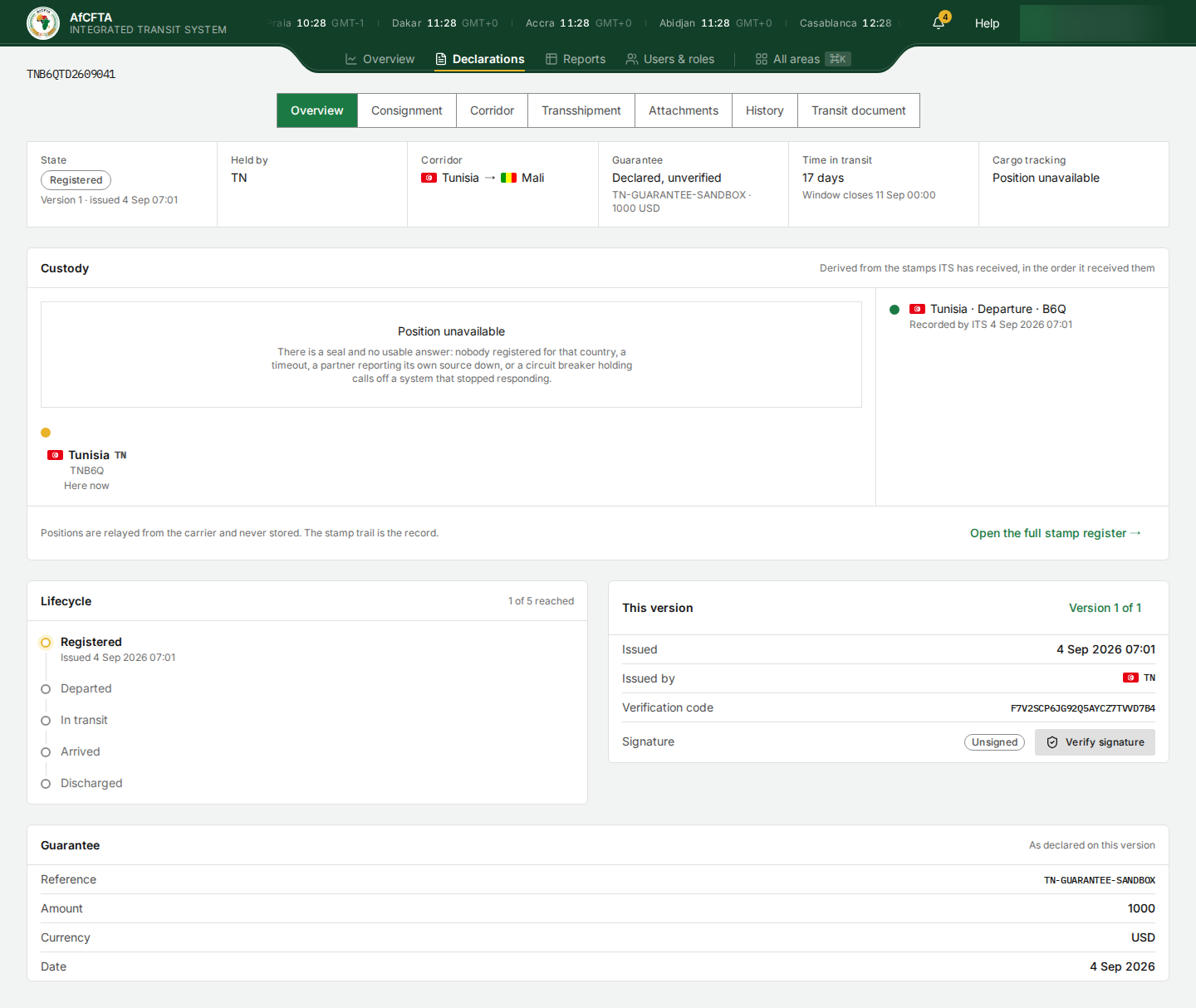
- A discharged declaration can still read Held by: Between administrations — Awaiting a UG entry stamp, with Entry stamp expected at the end of the custody list, and the corridor can show the destination country twice. The discharge is the real last act.
- The Lifecycle times can be out of order. Each state shows when it was reached last, so for a long corridor Departed can show the destination's release, later than In transit and Arrived.
- Version 15 · issued 20 Sep 22:27 shows the time version 1 was issued, not version 15. The History tab has the right time for each version.
- Issued by names the country of the latest act, not the country that lodged the declaration.
- Time in transit keeps counting after the transit is discharged, and an overdue declaration is not marked as overdue here.
- Amounts have no thousands separators:
3200000is 3,200,000. - Times have no time-zone label. They are in your browser's time zone.
Consignment
The declaration as lodged, laid out by the sections of the Transit Document form.
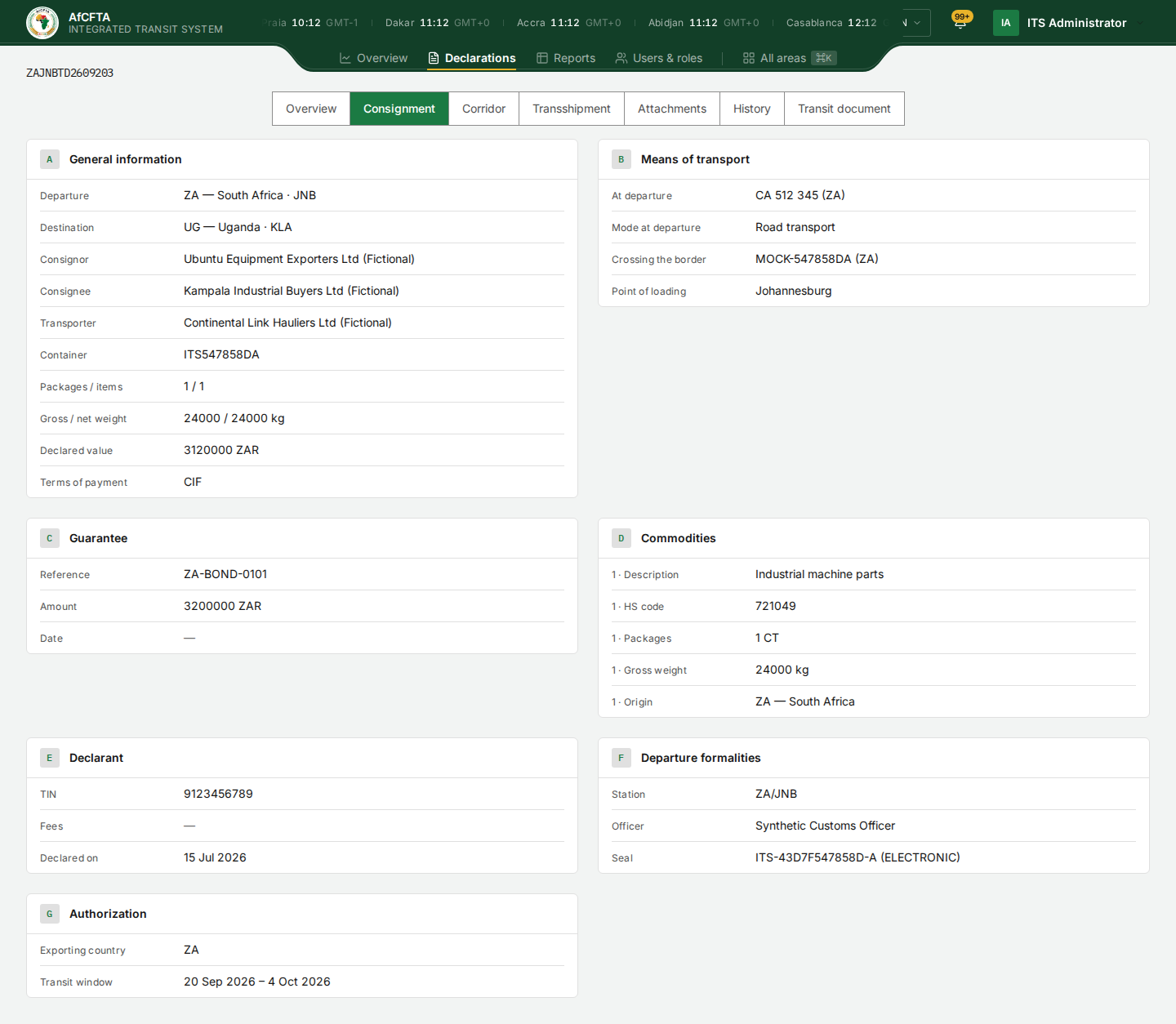
| Section | What it holds |
|---|---|
| A · General information | Departure and destination offices, consignor, consignee, transporter, container, packages and items, weights, declared value, terms of payment |
| B · Means of transport | The vehicle at departure, the mode, the vehicle crossing the border, the point of loading |
| C · Guarantee | Reference, amount, date |
| D · Commodities | Each commodity: description, HS code, packages, weight, origin |
| E · Declarant | TIN, fees, the declaration date |
| F · Departure formalities | The office of departure, the officer and the seal. Section F can never be amended |
| G · Authorization | The exporting country and the transit window |
A section with nothing in it says Nothing declared. A missing value shows an em dash, —.
- Numbers have no thousands separators:
24000 / 24000 kg,3120000 ZAR. - An HS code is shown as a number only, with no description of the tariff line. The Description is what the declarant wrote, and may not match the code.
- On a test installation, parties are marked (Fictional) and officers and plates can carry test names.
Corridor
Every stamp ITS has received against the declaration, oldest first. Nobody declared the route up front: each country named only the next one.
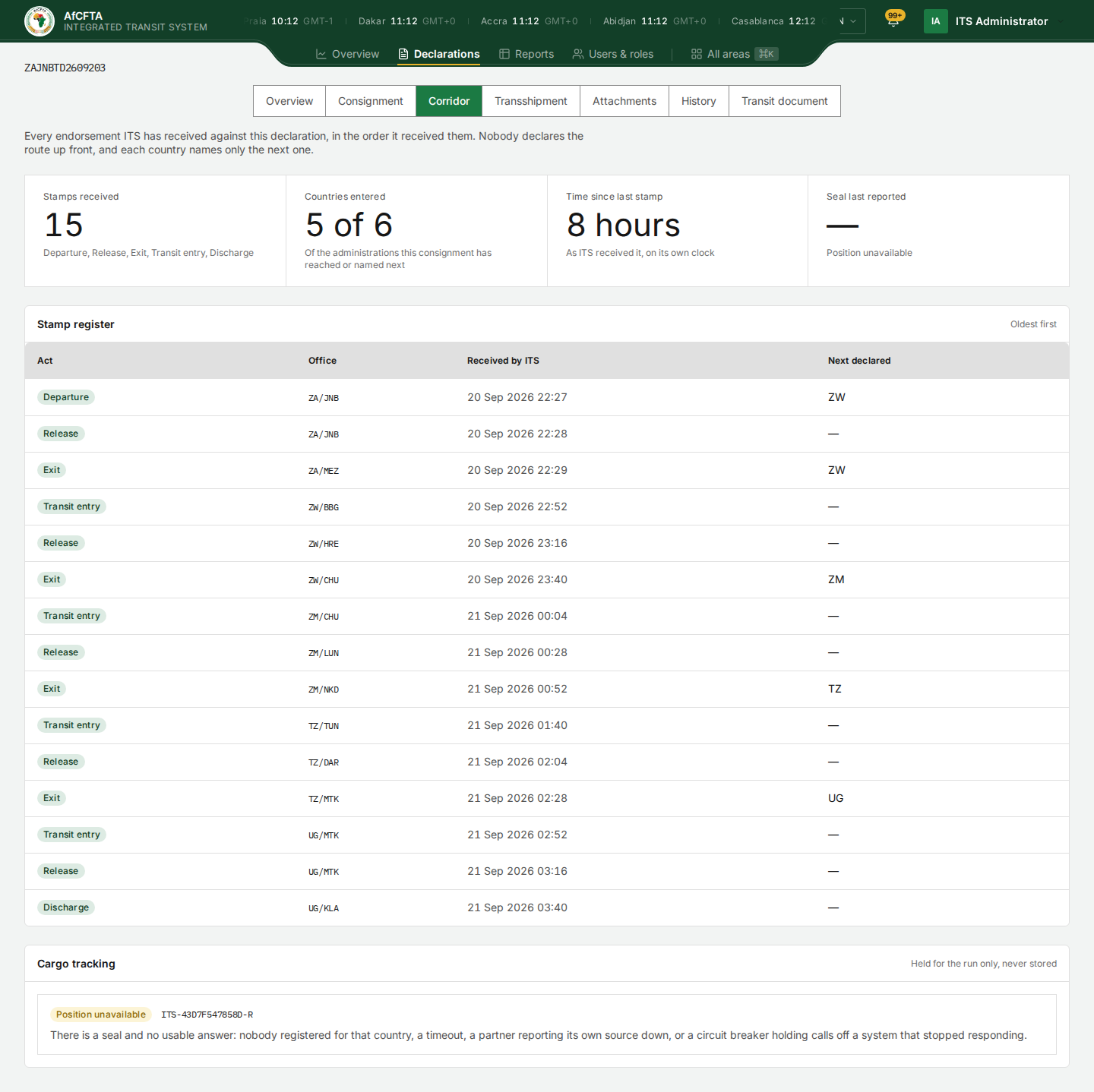
| Figure | What it shows |
|---|---|
| Stamps received | How many, and which kinds |
| Countries entered | Of the administrations the consignment has reached or been sent to, how many have stamped entry |
| Time since last stamp | On ITS's own clock |
| Seal last reported | The latest seal position, or a dash |
| Column of the Stamp register | What it shows |
|---|---|
| Act | Departure, Release, Exit, Transit entry or Discharge |
| Office | Country and office code, such as ZW/BBG |
| Received by ITS | When ITS received the stamp. This is ITS's clock, not the time the officer signed |
| Next declared | On an exit (and on the departure stamp), the country named as next |
The Cargo tracking tile at the bottom asks the seal platform for the current position when you open the tab, and keeps nothing: Held for the run only, never stored.
Countries entered can read 5 of 6 on a five-country route that is complete, because the destination is counted twice. See the Overview caution above.
Transshipment
Which vehicle carried the goods over which stretch, read from section B of every version. A change of plate during the transit is a transshipment, whether or not anyone called it one.
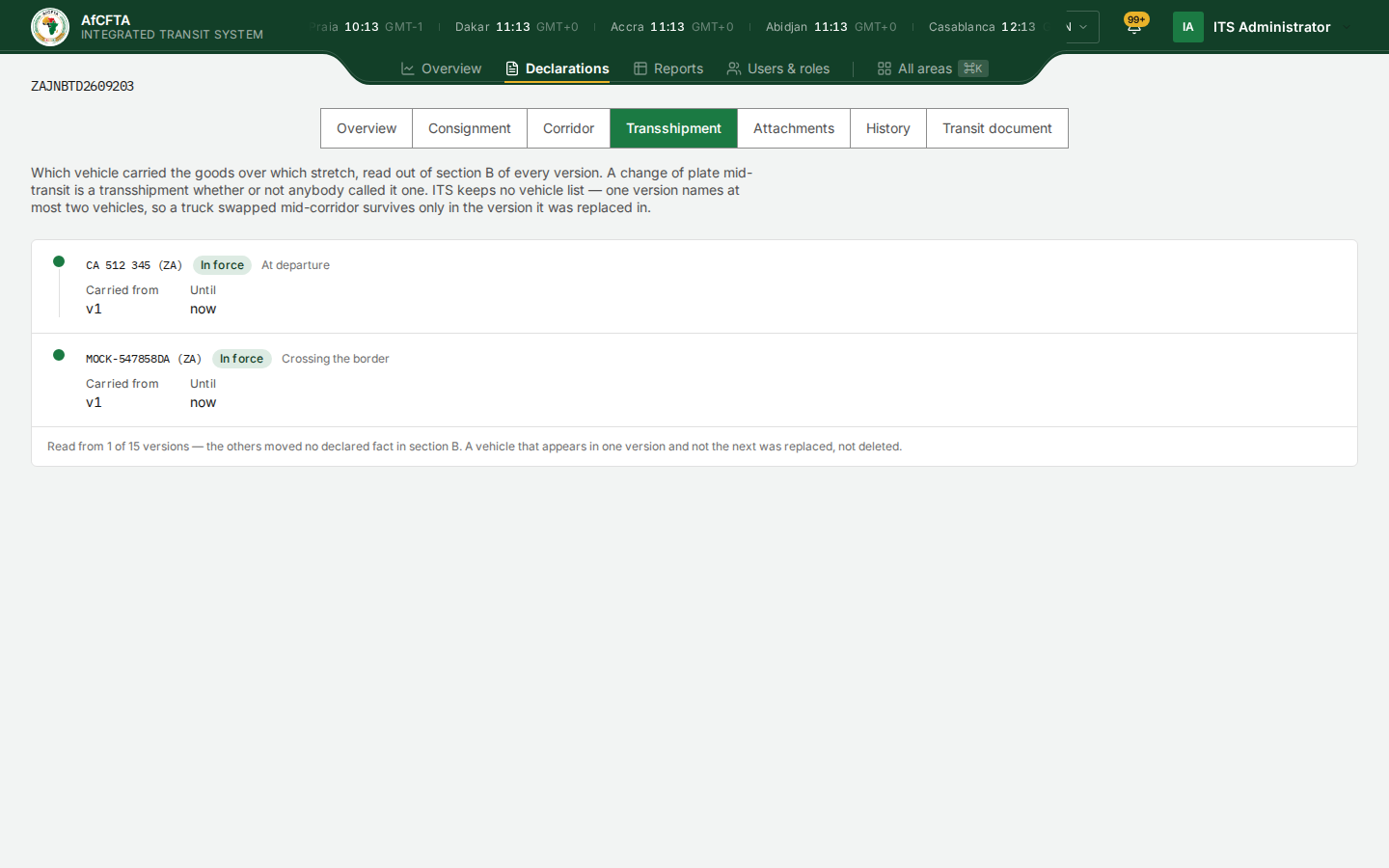
Each vehicle shows its plate and nationality, In force or Replaced, its role (at departure or crossing the border), and Carried from and Until as version numbers. Read from 1 of 15 versions means only one version changed a vehicle; the others moved nothing in section B.
History
Every version, what changed between two of them, and who has been told.
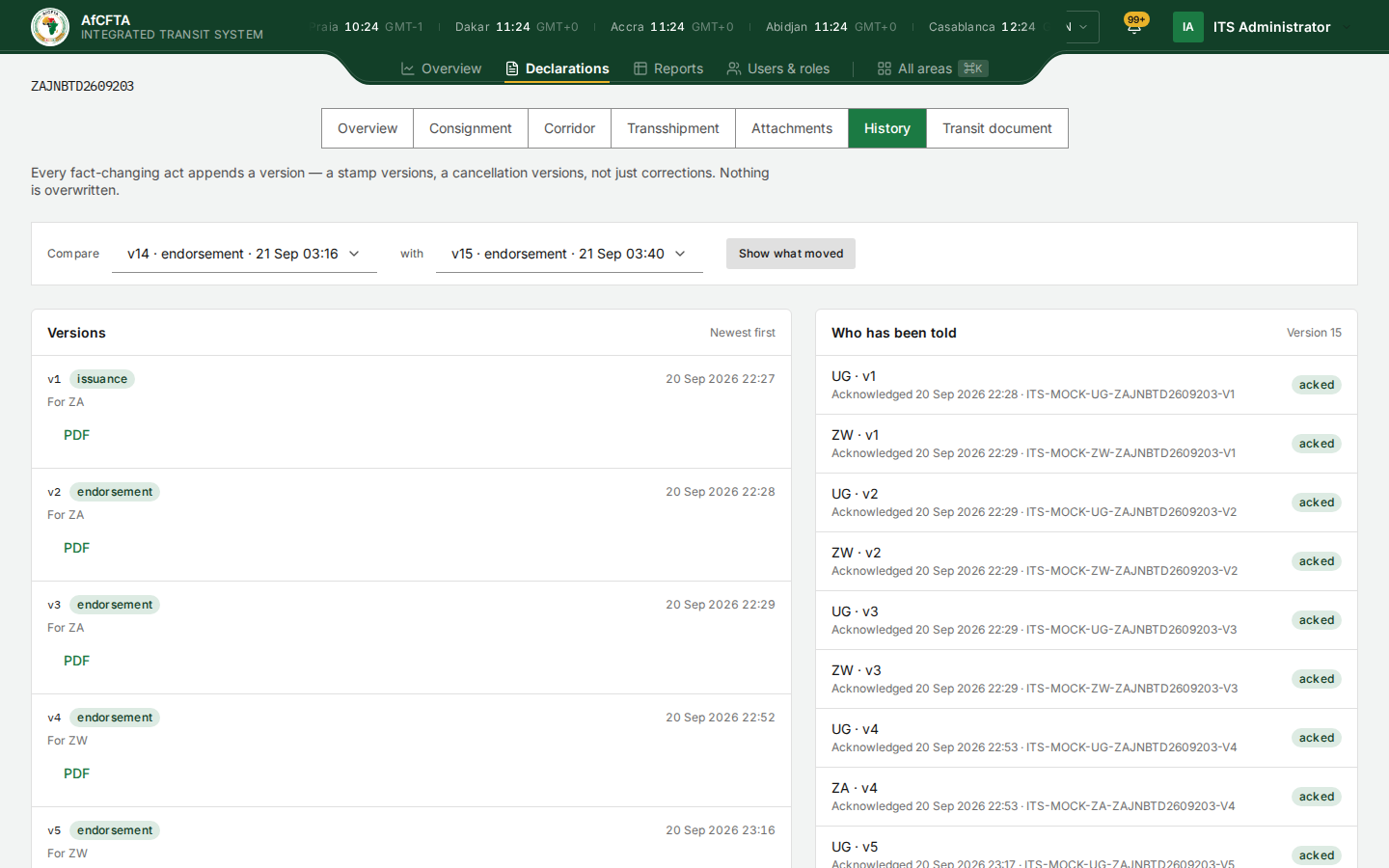
Versions
One row per version, with its number, its kind (issuance for version 1, endorsement for a stamp, and others for a correction, an attachment or a cancellation), the time, the country whose act created it, For ZA, and a PDF link that opens that version's Transit Document in a new browser tab.
Compare two versions
- In Compare, choose the earlier version.
- In with, choose the later one.
- Select Show what moved.
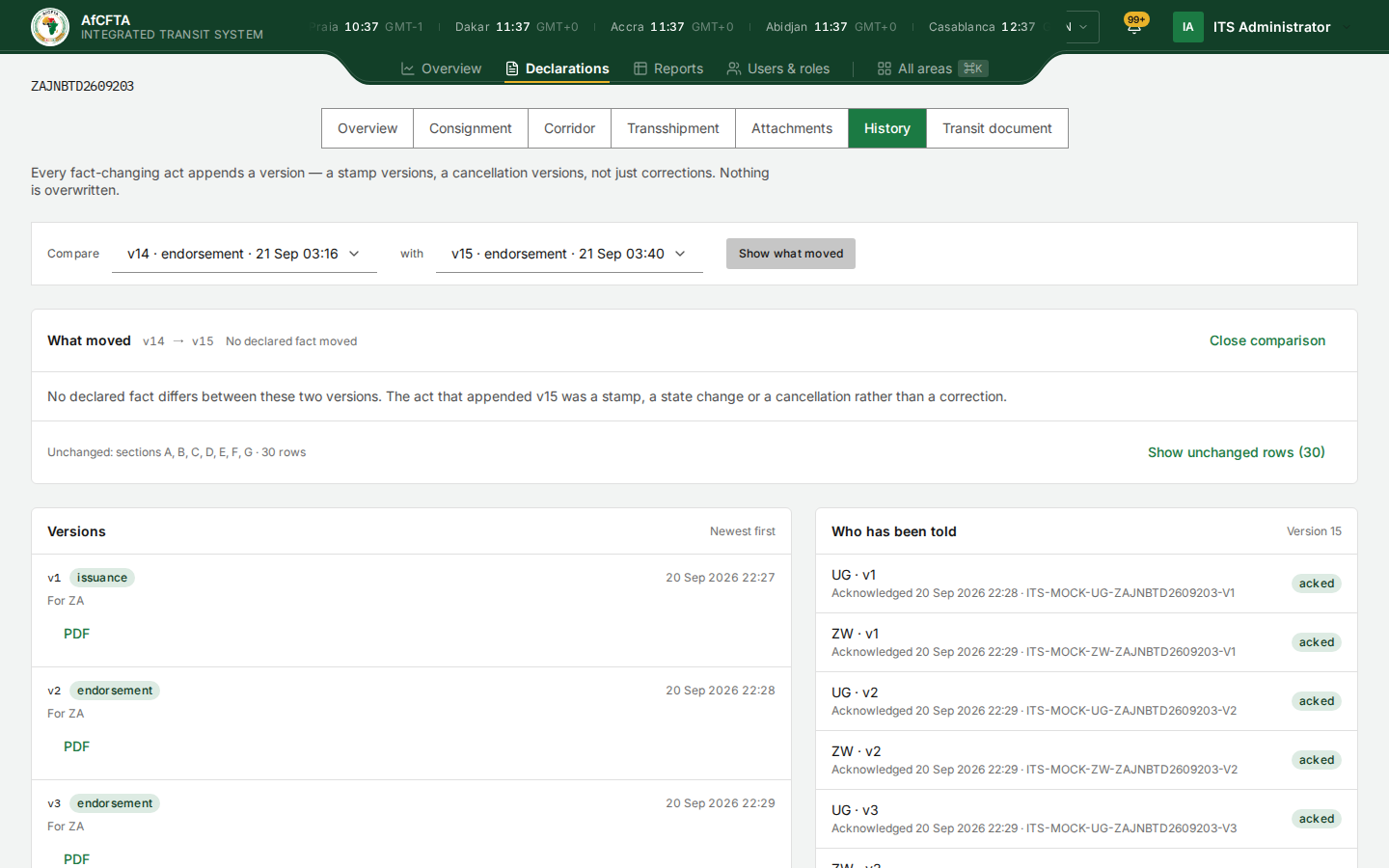
What moved lists each field that changed, with its old and new value. When nothing declared changed, as for a stamp, it says so. Show unchanged rows shows the rest; Close comparison hides the panel.
Who has been told
Each announcement ITS sent for this declaration, as UG · v1, Acknowledged 20 Sep 2026 22:28 and the acknowledgement's reference, with acked or pending. A country is never told about its own act, so it does not appear against the versions it created.
- The list is headed Newest first but starts with version 1.
- Who has been told says Version 15 but lists the announcements of every version.
- A country with no system on ITS shows as pending with no endpoint registered. That is not a delivery failure.
Not available
If a declaration does not exist, or is outside your organisation's scope, the page says:
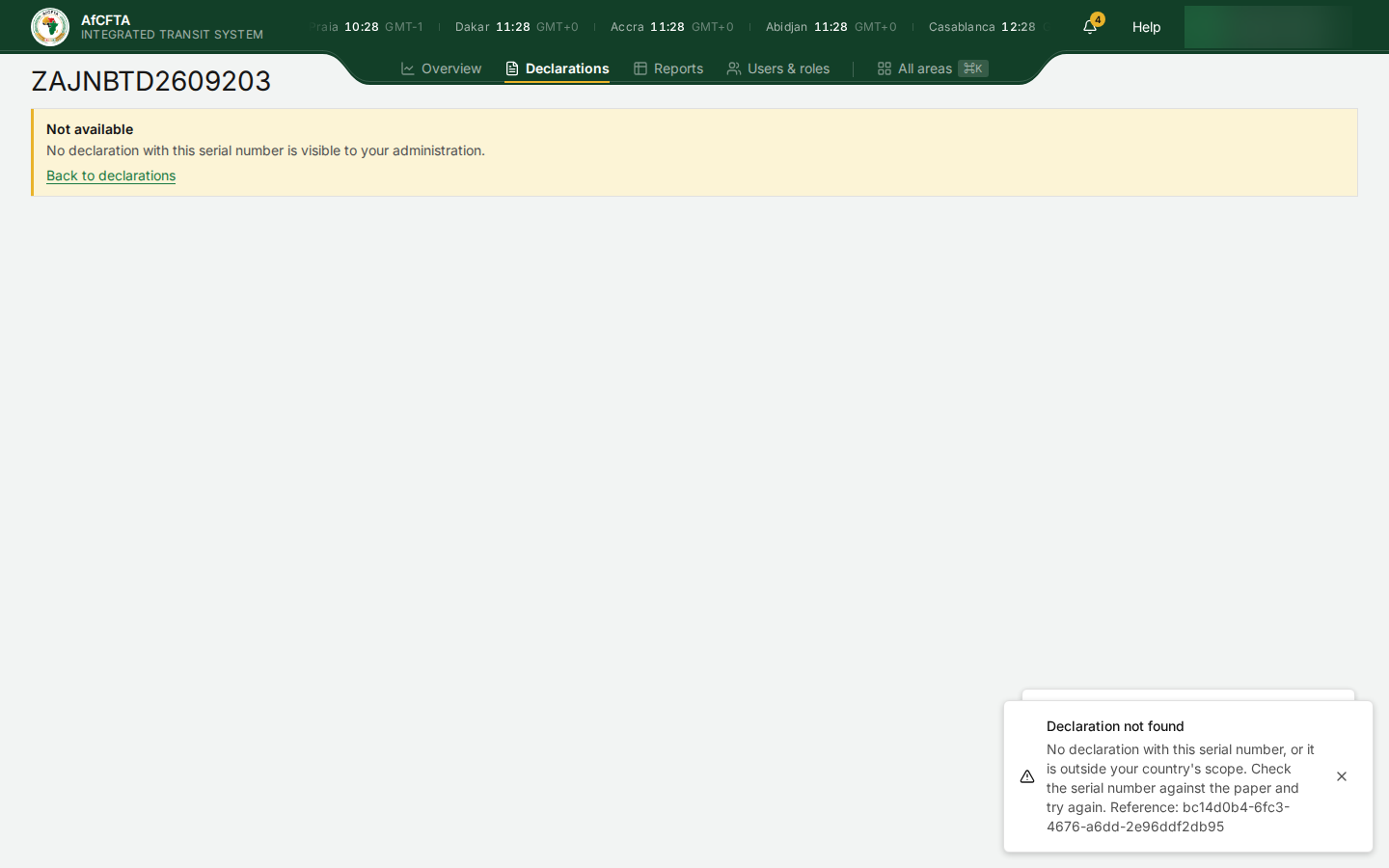
ITS gives the same answer in both cases, on purpose. It can take about ten seconds to appear. Back to declarations returns you to the register.