All reports
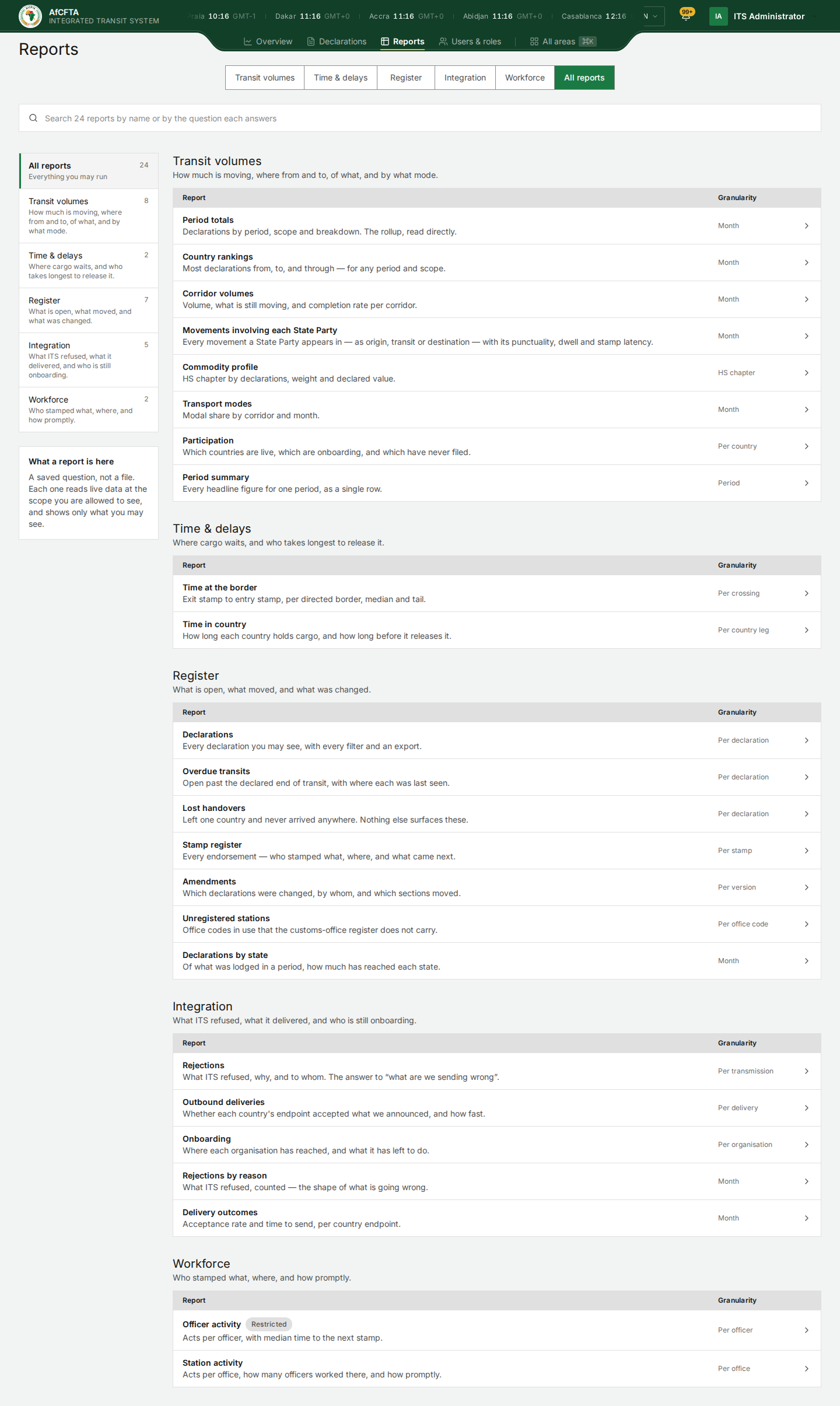
All reports is the last tab in Reports. It lists every saved report in one place. Use it when you know the report by name, or when a tile's Open full report is not the one you want.
A report here is a saved question, not a file. Opening one reads live data at the scope you may see, so the Secretariat, a State Party and a REC opening the same report get different rows.
Before you start
- You need at least one report permission. The library lists all 24 reports for everybody. A report from an area you may not read answers with nothing. See What each role can do.
- Know roughly what question you are asking: a count per period, a list of declarations, or a list of refusals.
The screen
| On the page | What it is for |
|---|---|
| Search 24 reports by name or by the question each answers | Narrows the list as you type. It matches the title and the one-line description. |
| The list on the left (All reports, Transit volumes, Time & delays, Register, Integration, Workforce) | Shows one area only. The number beside each is how many reports it holds. |
| What a report is here | A reminder that each report reads live data at your scope. |
| Report column | The report's name, a Restricted tag where it has one, and the question it answers. |
| Granularity | What one row of the report is: one declaration, one month, one crossing, and so on. Check it before you export a large report. |
Select a row to open the report. The full report page is described in Reports.
The 24 reports
Transit volumes (8)
| Report | What it answers | One row is |
|---|---|---|
| Period totals | Declarations by period, scope and breakdown, read straight from the stored totals. | Month |
| Country rankings | Which countries most declarations come from, go to and pass through. | Month |
| Corridor volumes | Volume, what is still moving and the completion rate for each corridor. | Month |
| Movements involving each State Party | Every movement a State Party appears in (as origin, transit or destination) with its punctuality, dwell and stamp latency. | Month |
| Commodity profile | Each HS chapter by declarations, weight and declared value. | HS chapter |
| Transport modes | Share of each transport mode by corridor and month. | Month |
| Participation | Which countries are live, which are onboarding, and which have never filed. | Per country |
| Period summary | Every headline figure for one period, as a single row. | Period |
Time & delays (2)
| Report | What it answers | One row is |
|---|---|---|
| Time at the border | Exit stamp to entry stamp for each directed border, median and 90th percentile. | Per crossing |
| Time in country | How long each country holds cargo, and how long before it releases it. | Per country leg |
Register (7)
| Report | What it answers | One row is |
|---|---|---|
| Declarations | Every declaration you may see, with every filter and an export. | Per declaration |
| Overdue transits | Declarations still open after the declared end of transit, with where each was last seen. | Per declaration |
| Lost handovers | Declarations that left one country and never arrived anywhere. | Per declaration |
| Stamp register | Every stamp: who stamped what, where, and what came next. | Per stamp |
| Amendments | Which declarations were changed, by whom, and which sections moved. | Per version |
| Unregistered stations | Office codes in use that the customs office register does not hold. | Per office code |
| Declarations by state | Of what was lodged in a period, how much has reached each state. | Month |
Integration (5)
| Report | What it answers | One row is |
|---|---|---|
| Rejections | What ITS refused, why, and whose call it was. | Per transmission |
| Outbound deliveries | Whether each country's system accepted what ITS announced to it, and how fast. | Per delivery |
| Onboarding | How far each organisation has got with connecting, and what it has left to do. | Per organisation |
| Rejections by reason | The refusals counted by reason. | Month |
| Delivery outcomes | Acceptance rate and time to send, for each country's system. | Month |
Workforce (2)
| Report | What it answers | One row is |
|---|---|---|
| Officer activity (Restricted) | Stamps per officer, with the median time to the next stamp. It names individual officers. | Per officer |
| Station activity | Stamps per office, how many officers worked there, and how quickly. | Per office |
Officer activity is always tagged Restricted because it names individual officers. Only people who may read the Workforce area can run it. The tag is the same whoever is looking: an Organisation admin who holds that permission sees the tag and can open the report.
Three reports have an address that does not match their name. Unregistered
stations opens at /reports/unreconciled-stations, Period summary at
/reports/overview-kpi and Transport modes at
/reports/transport-mode-split. If you share a link, quote the name on the
page.
Things to know before you rely on a report
Several reports show values as ITS stores them rather than in words: states
such as IN_TRANSIT, reasons such as NOT_ENTITLED, scopes such as world
and region, and column names such as act_latency_hours_p50. Period
totals also shows an internal row number in its # column. See the
Glossary for the states and reasons, and ignore
the # column.
When you move from one report to another, the table can briefly show the rows and total of the report you left (for example "1–10 of 37,229 rows" of dashes) before the new rows arrive. Wait until the total stops changing before you read or export.
On the development system several reports carry test records: officers named
MOCK-1, sandbox goods and guarantees, and old serial numbers in a longer
format. They are not real traffic.
Related pages
- Reports: the period, the scope sentence and exporting.
- Produce a monthly report
- What each role can do