Approve receiving endpoints
An organisation in Live says where ITS should send its announcements: the receiving endpoint, the address of its service. ITS sends announcements there over HTTPS, and also calls it for the guarantee check. Nothing is sent to a new endpoint until the Secretariat approves it. This page covers that approval.
What the organisation does on its side is on Announcements to your system.
Before you start
- You need Secretariat admin or System admin. See What each role can do.
- Every approval and switch back is recorded against your account.
Where the requests appear
A new receiving endpoint appears only on the organisation's review screen, under Waiting for you. There is no list of endpoints across organisations, so an organisation that declares one may need to tell you. The Needs attention tile in the register does not count them.
Approve a receiving endpoint
- Open the organisation's review screen.
- Under Waiting for you, find Approve a new receiving endpoint. It shows the Address and how ITS signs in: OIDC client credentials or No callback authentication.
- Check the address with the organisation if you have any doubt. ITS will send every announcement for that country there.
- Select Approve endpoint.
- In Send announcements here?, read the address again and select Approve endpoint, or Cancel.
The item leaves Waiting for you and, in Receiving endpoints, the row turns Approved and the In force box names its address. There is no separate confirmation message.
What approval does, in the window's own words: "ITS calls this address for every announcement this country is a party to, from the next delivery attempt. The endpoint in force now stands down. Announcements deferred for want of an endpoint drain by themselves. The approval is recorded against you."
The portal can approve an endpoint; it cannot reject or delete one. An endpoint you will not approve stays Awaiting approval, and its item stays under Waiting for you, until the organisation declares another and you approve that one. Tell the organisation why, outside the portal.
The Receiving endpoints history
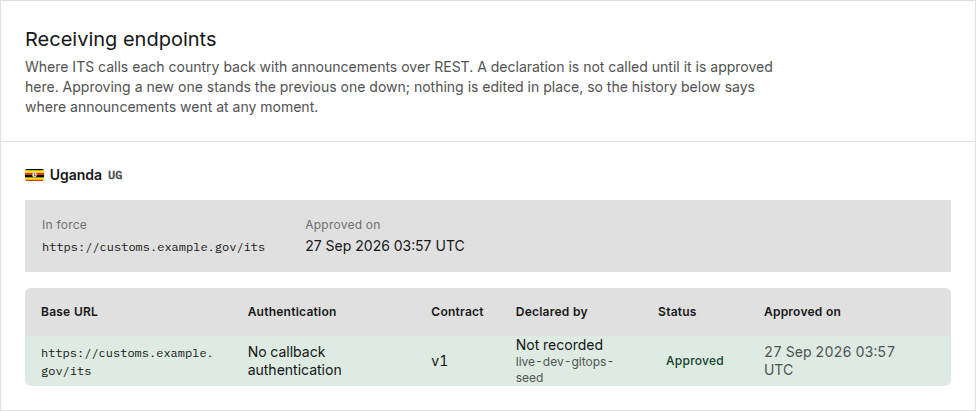
The card has one block per country: one for a State Party, one per member State for a REC. A block with requests waiting carries an amber tag such as 1 awaiting approval.
In force names the address ITS calls today and Approved on. With none, it reads "No endpoint is approved for this country, so ITS has nowhere to call it."
| Column | What it shows |
|---|---|
| Base URL | The address |
| Authentication | How ITS signs in, with the client ID for OIDC client credentials |
| Contract | The version of the partner contract the endpoint implements. There is one version today, v1 |
| Declared by | This organisation; or the link Another organisation, which opens it (for a country, the REC filing for it; for a REC, the country itself); or Not recorded. The user who declared it is beneath |
| Status | See below |
| Approved on | When it was approved, or — |
| Status | Meaning | What you can do |
|---|---|---|
| Awaiting approval | Declared, not called yet | "Approve it under Waiting for you." |
| Approved | The address in force | Nothing |
| Superseded | The same organisation's later endpoint replaced it | Nothing. It is final |
| Displaced | Another organisation's endpoint took delivery for the country | Switch back |
When you approve an endpoint, the one in force becomes Superseded if the same organisation declared it, and Displaced if another organisation did.
An organisation that has declared nothing reads "This organisation has not declared a receiving endpoint. Announcements for its countries are queued, not lost."
Switch back to a displaced endpoint
- In Endpoint history, find the Displaced row.
- Select Switch back.
- In Switch back to this endpoint?, select Switch back, or Cancel.
The row turns Approved and the endpoint that was in force stands down, from the next delivery attempt.
What a refused endpoint approval means
| Title | Meaning | What to do |
|---|---|---|
| This endpoint can no longer be approved | "Either the organisation has since declared a newer endpoint and this one was superseded, or it was declared by a union that no longer files for this country." | "Reload the endpoints. The organisation entitled to receive for this country must declare an endpoint again." |
| Receiving endpoint not found | The endpoint no longer exists | Reload the list and choose again |
The codes are explained in the error catalogue.
Related pages
- Review an organisation
- The register
- Announcements to your system: the organisation's side.
- Receiving announcements
- Statuses and colours: how each delivery reads on a declaration.